
FBR IRIS Login Guide Pakistan 2026 — Step-by-Step + Best Taxation Courses
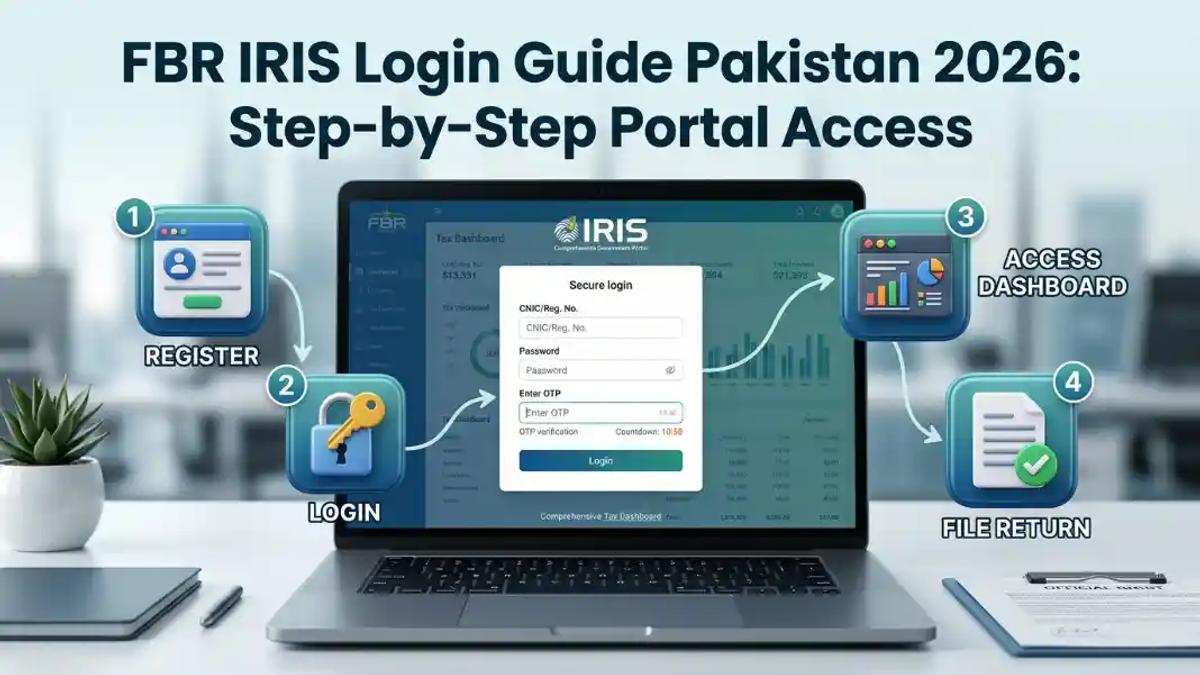
If you've ever stared at the FBR IRIS portal wondering where to even begin, you're not alone. Millions of Pakistani taxpayers, salaried employees, freelancers, and business owners visit iris.fbr.gov.pk every year — and a huge chunk of them get stuck at the very first step. This guide walks you through everything: how to log in, register, reset your password, file your return, and — if you want to turn this knowledge into a career — where to find the best taxation courses in Pakistan in 2026.
Let's break it all down, step by step.
What Is FBR IRIS? (The Simple Answer)
FBR IRIS stands for Integrated Revenue Information System, and it is the official online taxpayer portal of the Federal Board of Revenue (FBR) Pakistan. Think of it as your personal tax dashboard — everything from getting your NTN number, filing your income tax return, paying taxes online, to checking your active taxpayer status happens right here.
The portal is accessible at the official URL: iris.fbr.gov.pk
IRIS replaced the old manual tax filing process and made Pakistan's tax system fully digital. Whether you are a salaried person, a freelancer, or a business owner, FBR IRIS is your gateway to becoming a tax filer in Pakistan.
Why FBR IRIS Matters in Pakistan (2026)
Pakistan's tax-to-GDP ratio has historically been low. To fix this, the Federal Board of Revenue made e-filing mandatory and introduced heavy penalties for non-filers through the FBR Non-Filer Penalties 2026 guide. Being an active taxpayer on the ATL (Active Taxpayer List) gives you real financial advantages:
- Lower withholding tax on banking transactions
- Ability to buy/sell property without extra tax burden
- Access to government contracts and tenders
- Legal protection and documented income for visa applications
If you want to understand the full filer vs non-filer comparison, read this detailed breakdown: Filer vs Non-Filer in Pakistan.
Documents Required for FBR IRIS Registration
Before you start the login or registration process, keep these documents ready:
- CNIC (Computerized National Identity Card)
- Active mobile number (registered with your CNIC)
- Email address (personal, active)
- Bank account details (for salaried or business persons)
- Business NTN (if registering as a company or AOP)
- Employer NTN (for salaried individuals)
How to Register on FBR IRIS — Step-by-Step (2026)
If you are a first-time user, you need to create an account before you can log in. Here is how:
Step 1: Go to the official FBR IRIS portal at https://iris.fbr.gov.pk
Step 2: Click on "Registration for Unregistered Person" on the homepage.
Step 3: Enter your CNIC number and the on-screen captcha, then click Submit.
Step 4: A PIN code will be sent to your registered mobile number. Enter this PIN to verify your identity.
Step 5: Fill in your personal details — name, address, email, phone number, and income source.
Step 6: Create a strong password for your IRIS account. Note it down safely.
Step 7: Submit the form. Your NTN (National Tax Number) will be generated instantly.
Step 8: You will receive a confirmation email. Your account is now active.
That's it. You are now registered on the FBR IRIS portal and eligible to file your income tax return. For a full NTN registration walkthrough, visit: Steps to Obtain NTN Pakistan 2026.

How to Register on FBR IRIS — Step-by-Step (2026)
FBR IRIS Login — Step-by-Step Guide 2026
Once registered, here's how to log in to IRIS FBR:
Step 1: Open your browser and visit https://iris.fbr.gov.pk
Step 2: Click on "Taxpayer Login" on the main page.
Step 3: Enter your CNIC as the username (without dashes).
Step 4: Enter your IRIS password.
Step 5: Complete the captcha verification.
Step 6: Click "Login". You will be directed to your IRIS dashboard.
Your dashboard shows your tax profile, filed returns, pending notices, payment history, and ATL status — all in one place.
Pro Tip: Always use Google Chrome or Mozilla Firefox for the best IRIS experience. Internet Explorer and older browsers often cause login errors.
FBR IRIS Login Problems — Common Errors and Fixes
Many users face issues logging into IRIS. Here are the most common problems and their solutions:
Problem 1: "Invalid Username or Password"
- Double-check your CNIC — enter it without dashes (e.g., 3740512345678).
- Make sure Caps Lock is off when typing your password.
Problem 2: "Internal Server Error (IRIS-ERR-77)"
- This is a server-side issue on FBR's end. Try again after 30 minutes or during off-peak hours (early morning works best).
Problem 3: "Your Account is Locked"
- Too many failed login attempts lock your account. Call FBR helpline at 0800-00227 to unlock it.
Problem 4: IRIS portal not loading
- Clear your browser cache, disable VPN if active, and try a different browser.
How to Reset FBR IRIS Password (2026)
Forgot your IRIS password? No stress. Here is how to recover it:
Step 1: Go to https://iris.fbr.gov.pk
Step 2: Click on "Forgot Password" on the login page.
Step 3: Enter your CNIC number.
Step 4: A reset link or PIN will be sent to your registered email and mobile number.
Step 5: Follow the link, set a new strong password, and log in.
If you have lost access to your registered email or phone number, you will need to visit your nearest Regional Tax Office (RTO) with your original CNIC for manual verification.
How to File Income Tax Return on FBR IRIS (2026)
Filing your tax return on IRIS is simpler than most people think. Here is the simplified process:
Step 1: Log in to your IRIS account at iris.fbr.gov.pk.
Step 2: From the left panel, click "Declaration" and then select "Income Tax Return".
Step 3: Select the relevant tax year (for 2026, select Tax Year 2025).
Step 4: Fill in your income details — salary, business income, rental income, freelancing income, etc.
Step 5: Add your deductions and tax credits (provident fund, life insurance, education expenses, etc.).
Step 6: Review the computed tax liability. If tax is payable, generate a PSID and pay through your bank or mobile wallet.
Step 7: Submit the return. Download your Acknowledgement Slip as proof.
For salaried individuals, your employer's NTN and salary certificate are the two most critical inputs. Read more here: Income Tax Return Filing Guide Pakistan.
For freelancers, check out: FBR Return Filing for Freelancers Pakistan 2026.
How to Check Active Taxpayer Status on FBR
Want to know if you are on the ATL (Active Taxpayer List)? Here's how:
Method 1 — Online:
- Visit https://atl.fbr.gov.pk
- Enter your CNIC or NTN number and check your status instantly.
Method 2 — SMS:
- Send your CNIC to 9966 via SMS.
- You will receive an SMS reply confirming your ATL status.
Method 3 — IRIS Dashboard:
- Log in to IRIS and your ATL status is displayed on your main profile page.
To become an active taxpayer and understand the full process: How to Become Active Tax Filer Pakistan.

Check Active Taxpayer Status
What Is NTN and How Is It Different from STRN?
This is one of the most-asked questions by beginners entering Pakistan's tax system.
NTN (National Tax Number) is assigned to individuals, salaried employees, and business owners for income tax purposes. It is your unique tax identity number under the Income Tax Ordinance 2001.
STRN (Sales Tax Registration Number) is assigned to businesses and manufacturers who are registered for sales tax under the Sales Tax Act. It is also called a "Sales Tax Number."
In short: NTN is for income tax. STRN is for sales tax. A business can have both. For a detailed comparison of ATL, NTN, and STRN: Difference ATL NTN STRN SECP Pakistan 2026.
How to Register for Sales Tax on FBR Portal
If your annual turnover exceeds PKR 10 million, you are required to register for sales tax. Here's the process:
Step 1: Log in to IRIS and click on "Registration" from the left menu.
Step 2: Select "Sales Tax Registration" and fill in the business details.
Step 3: Upload required documents — business ownership proof, CNIC, lease agreement, utility bill of business premises.
Step 4: Submit. Your application is reviewed and an STRN is assigned upon approval.
For a complete guide: Register Sales Tax Pakistan 2026.
FBR IRIS Income Tax Slabs 2025–26
Understanding your tax liability before filing helps you plan better. Here are the current income tax slabs for salaried individuals under the Finance Act 2025–26:
| Annual Income (PKR) | Tax Rate |
| Up to 600,000 | 0% |
| 600,001 – 1,200,000 | 5% |
| 1,200,001 – 2,400,000 | 15% |
| 2,400,001 – 3,600,000 | 25% |
| 3,600,001 – 6,000,000 | 30% |
| Above 6,000,000 | 35% |
For a full breakdown: Income Tax Slabs Pakistan 2025–26.
Best Taxation Courses in Pakistan 2026 — City-Wise Guide
Now that you understand FBR IRIS, what if you could turn this knowledge into a full-time career? The demand for certified tax professionals in Pakistan — and internationally — has never been higher. Here's where you can learn:
Why Taxation Is One of the Smartest Career Choices in 2026
Every business in Pakistan needs tax compliance. Every individual needs a tax filer. Freelancers are being required to declare income. The result? Tax consultants are in massive demand, with salaries ranging from PKR 50,000 to PKR 300,000+ per month depending on specialization and experience. Read more: Tax Advisor Salary and Scope Pakistan 2026.
Best Taxation Institute in Pakistan — ICT (Institute of Corporate & Taxation)
When it comes to the best taxation courses in Islamabad and Pakistan, one name consistently tops the list: ICT — Institute of Corporate and Taxation.
Located in Islamabad, ICT offers Pakistan's most comprehensive and practically-focused taxation programs. Their courses are not theory-heavy — they train you on the actual FBR IRIS portal, real return filing, audit handling, and live case studies.
Visit: ict.net.pk
Taxation Courses Available at ICT
| Course | Ideal For |
| Certified Tax Advisor Course | Beginners to Advanced |
| Master Sales Tax Course | Accountants, Business Owners |
| Advance Taxation & Litigation | Legal & Corporate Professionals |
| UK Taxation Course | Freelancers, International Clients |
| USA Taxation Course | Freelancers, Remote Workers |
| Canadian Taxation Course | Overseas & Freelance Professionals |
| UAE Taxation Course | Gulf-based or aspiring professionals |
| Saudi Taxation Course | Saudi Arabia job seekers |
| LLC Formation Course | Entrepreneurs |
| Certified Business Advisor | Business Consultants |
What You Will Learn in ICT's Certified Tax Advisor Course
- Complete FBR IRIS portal navigation and return filing
- Income tax return filing for salaried, business, and freelance individuals
- Sales tax registration and monthly return filing
- Withholding tax statements and their implications
- FBR audit handling and responding to notices
- NTN and STRN registration procedures
- SECP company registration and annual compliance
- Practical case studies using real taxpayer data
This course is especially valuable for: Why CA Students Must Learn Practical FBR Filing.
Career Opportunities After a Taxation Course in Pakistan
The question most students ask is: "Can I actually earn after this course?" The honest answer is yes — and here's what the career landscape looks like:
- Tax Consultant (Freelance): PKR 60,000–150,000/month
- Tax Manager (Corporate): PKR 80,000–200,000/month
- FBR Officer / Inspector: Competitive government pay + perks
- International Tax Consultant (UAE, UK, USA): $1,500–$5,000/month
- Tax Advisor for SMEs: Retainer-based (PKR 20,000–50,000 per client/month)
For full career details: Career Opportunities After Becoming a Certified Tax Advisor.
Thinking about the international angle? Tax Skills Salary Comparison USA UK UAE Saudi 2026.
FBR IRIS 2.0 — What's New in 2026?
FBR launched IRIS 2.0 with several upgrades that make the portal faster and more user-friendly. Key improvements include:
- Improved taxpayer dashboard with real-time ATL status
- Faster NTN generation (often within minutes)
- Better mobile responsiveness
- Integration with Tax Asaan app for simplified filing
- Enhanced audit trail and notice management
For a deep dive into the new system: FBR IRIS 2.0 — 2026 Tax Survival Guide.
Helpful FBR Official Links (Authority Resources)
For direct access to FBR's official tools and portals:
- 🔗 FBR IRIS Portal: https://iris.fbr.gov.pk
- 🔗 FBR Main Website: https://www.fbr.gov.pk
- 🔗 Active Taxpayer List Check: https://atl.fbr.gov.pk
- 🔗 FBR Maloomat Portal: https://maloomat.fbr.gov.pk
- 🔗 FBR Helpline: 0800-00227 (Toll-Free)
- 🔗 Tax Asaan Mobile App: Available on Google Play & App Store
Frequently Asked Questions (FAQs)
What is FBR IRIS and how does it work? FBR IRIS (Integrated Revenue Information System) is Pakistan's official online tax portal at iris.fbr.gov.pk. It allows taxpayers to register for NTN, file income and sales tax returns, pay taxes, respond to FBR notices, and check their active taxpayer status — all online without visiting a tax office.
How do I login to FBR IRIS for the first time? Visit iris.fbr.gov.pk, click "Taxpayer Login," enter your CNIC as the username and your registered password, complete the captcha, and click Login. If you haven't registered yet, click "Registration for Unregistered Person" first.
How to reset FBR IRIS password in 2026? Click "Forgot Password" on the IRIS login page, enter your CNIC, and a reset link will be sent to your registered email and phone. Follow the link to set a new password. If your contact details are outdated, visit your nearest RTO with your CNIC.
What documents are required for FBR registration? You need your CNIC, an active mobile number linked to your CNIC, a personal email address, and bank account details. Business owners additionally need their business address proof and utility bills.
How to check if I am an active taxpayer in Pakistan? Visit atl.fbr.gov.pk and enter your CNIC or NTN, or send your CNIC number via SMS to 9966. You can also check your status directly from the IRIS dashboard after logging in.
What is the best taxation course in Pakistan in 2026? ICT — Institute of Corporate and Taxation in Islamabad is widely regarded as Pakistan's top taxation institute. Their Certified Tax Advisor course covers IRIS filing, income tax, sales tax, audit handling, and international taxation in a practical, hands-on format. Visit ict.net.pk/courses/certified-tax-advisor to learn more.
Can I file my tax return without a tax consultant? Yes. If your income sources are straightforward (single salary, no rental income), you can file independently on IRIS. However, for businesses, freelancers with multiple income streams, or individuals receiving FBR notices, a certified tax consultant adds significant value.
What is ATL surcharge in Pakistan? If a taxpayer's name is not on the Active Taxpayer List but they want to become a filer mid-year, they must pay an ATL surcharge — PKR 1,000 for individuals and PKR 20,000 for companies — to get added to the list outside the regular filing window.
How long does FBR IRIS registration take? IRIS registration typically takes 10–15 minutes online. Your NTN is generated immediately upon successful submission. The ATL (Active Taxpayer List) update happens within 24–48 hours after your return is filed.
What is the deadline for income tax return in Pakistan 2026? The standard deadline for filing income tax returns for Tax Year 2025 is September 30, 2025, though FBR frequently grants extensions. Always check fbr.gov.pk for the latest deadline updates.
Conclusion — Take Control of Your Taxes and Your Career
The FBR IRIS portal has transformed tax compliance in Pakistan. Whether you are a salaried professional trying to become a tax filer, a business owner managing your sales tax returns, or a freelancer declaring your foreign income — IRIS is where it all happens. And now you know exactly how to navigate it.
But here's the bigger picture: tax knowledge isn't just a compliance tool — it's a career. Pakistan's growing economy, combined with FBR's push for digital tax compliance, means the demand for skilled tax professionals will only increase through 2026 and beyond.
If you are serious about building a career in taxation — whether locally or internationally — ICT's Certified Tax Advisor Course gives you the most practical, job-ready training available in Pakistan today.
👉 Book Your Seat at ICT's Advanced Taxation Course — Pakistan's No. 1 Taxation Institute.
Also explore: No. 1 Institute of Corporate and Taxation in Islamabad | Why ICT Is Better Than Other Institutes | Is a Certified Tax Advisor Course Worth It in 2026?
Comments (0)
No comments yet. Start the conversation!
Leave a Reply
Your email address will not be published. Required fields are marked *